
Assets
Track investments, property, and other valuables with live market prices, growth rules, or manual valuations.
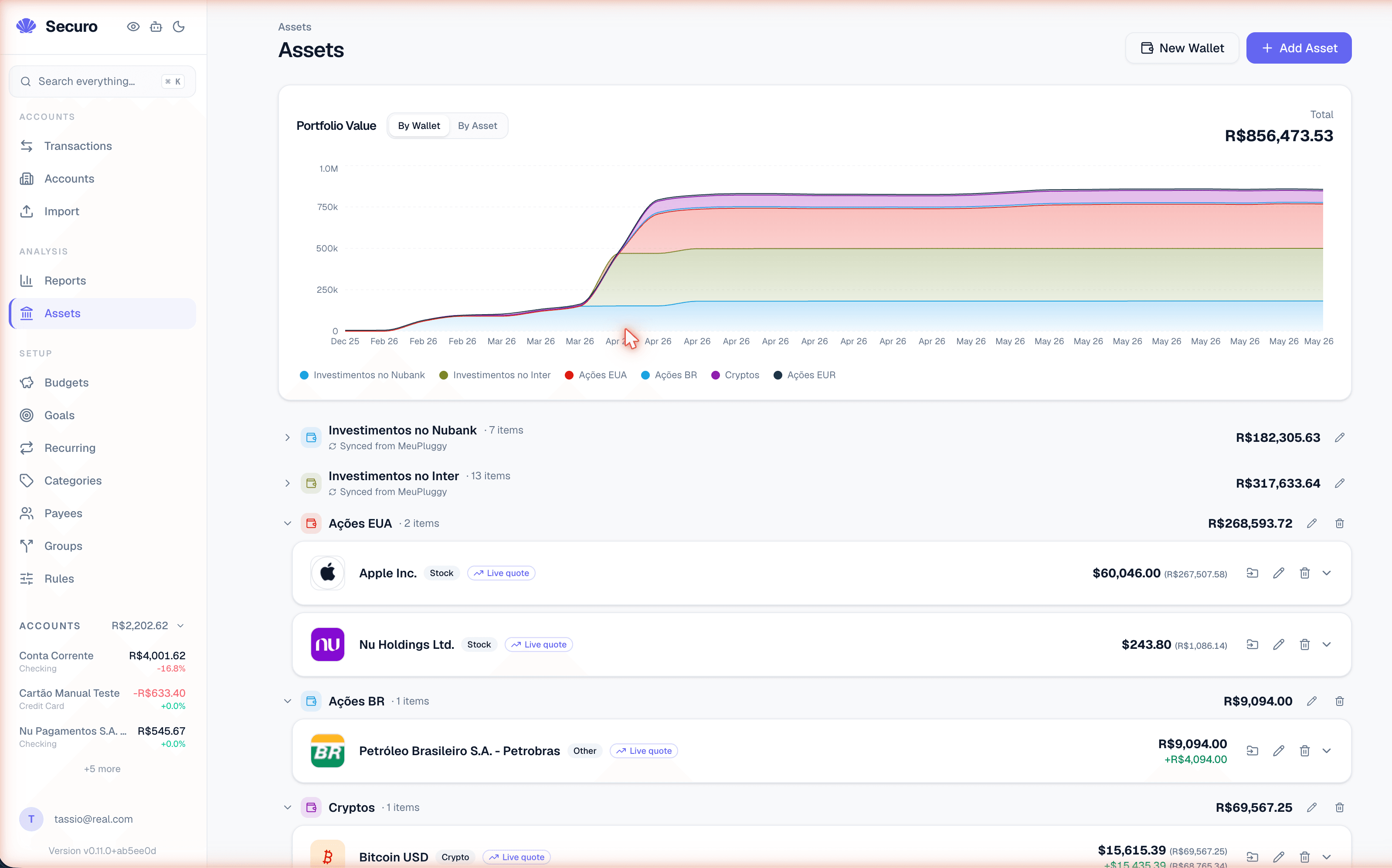
The Assets page is where you track everything you own that isn't sitting in a bank account — stocks, ETFs, crypto, real estate, vehicles, and other valuables. Each asset's value feeds into your overall Net Worth.
Asset Types
Securo supports a range of asset types, each with its own icon:
| Type | Examples |
|---|---|
| Stock | Individual company shares |
| ETF | Exchange-traded funds |
| Crypto | Bitcoin, Ethereum, and other tokens |
| Fund | Mutual funds and managed funds |
| Real Estate | Houses, apartments, land |
| Vehicle | Cars, motorcycles, boats |
| Valuable | Jewelry, art, collectibles |
| Investment | Generic investments |
| Other | Anything else |
Wallets
Assets are organized into wallets — groups like "Retirement", "Trading", or "Crypto". Each wallet shows a combined total and can be expanded or collapsed. Assets that aren't assigned to a wallet appear in an Ungrouped section.
To create a wallet, click + New Wallet. You can also create one inline while adding an asset.
Adding an Asset
Click + Add Asset and fill in the asset's name, type, currency, and optionally a wallet. You can also record a purchase date and purchase price so Securo can calculate your gain or loss.
The most important choice is the valuation method, which determines how the asset's value is kept up to date. It's locked once the asset is created.
Valuation Methods
| Method | How it works |
|---|---|
| Manual | You enter the value yourself and update it whenever you like. Best for property, vehicles, and valuables. |
| Growth Rule | You set a growth rate (percentage or fixed amount) and frequency (daily, weekly, monthly, yearly), and Securo projects the value automatically from a start date. |
| Market Price | You enter a ticker (e.g., AAPL, BTC-USD, PETR4.SA) and a quantity. Securo fetches the live price and keeps the value current. Best for stocks, ETFs, and crypto. |
For market-price assets, Securo shows a live quote preview as you type the ticker, and refreshes prices automatically each day.
Buy and Sell Ledger
For market-priced holdings, the transactions are the source of truth: record each buy and sell with its date, units, and price, and Securo derives the rest by replaying the ledger in order. That gives you:
- The current units held
- Your weighted-average price and cost basis
- The realized gain from sales, kept separate from unrealized gains
Editing a past entry (including its date) recomputes everything in the new order, so a correction never leaves stale numbers behind. Holdings you price yourself and positions you have already closed report their return too, in currency and percent.
Stock Splits
When a stock splits, record a split in the same ledger instead of editing past orders. A split is written as old units → new units: a 100-for-1 split is 1 → 100, a 1-for-10 reverse split is 10 → 1. Date it on the first day the holding trades at the new price. Securo rescales the units held and the average price from that date on, so the cost basis stays the same. Splits are available for market-priced holdings without a bank connection, can't be dated in the future, and a split that a later sale depends on can't be deleted.
Importing Orders From a Broker
Instead of typing each order, go to Import → Investments and upload your broker's CSV: one row per order with ticker, date, quantity and price, a negative quantity read as a sale. Map the columns like a statement import (a template with the expected structure is available), tickers are resolved against the price provider, and orders for a ticker already in your portfolio land on the existing holding. Every run is listed with its own history and can be undone.
Value History
Every asset keeps a value history. For manual assets, use the + Add Value form to record a new value with a date. Each entry shows the change from the previous one, color-coded green for gains and red for losses. Once an asset has two or more values, a trend chart appears in its detail panel.
Growth-rule and market-price assets build their history automatically.
Synced Assets
If you connect a brokerage or investment account through Bank Sync, your holdings are imported automatically as assets. Synced assets:
- Are marked with a Synced badge and grouped into a wallet named after the institution
- Update their values automatically on each sync
- Are read-only — they're managed by the connection, so editing is disabled
- Show not updated since a date when the provider still reports the position but has not refreshed its value for more than a week. It may have been redeemed, or the connection may be failing to refresh investments: check it with your bank. Nothing is closed or hidden for you. Pluggy reports this date today
You can still rename a synced wallet, move synced assets between wallets, and delete a synced asset. If asset import is on for that connection, the next sync brings it back; turn asset import off in the connection settings to keep it deleted.
Property and the Loans Against It
A Real Estate asset can have loans secured against it. Link a loan account to the property and the asset's detail panel lists each loan with its debt and the equity left: the property's value minus the debt sitting on it. A recorded mortgage payment can be split into principal and interest against the property.
Portfolio Value
At the top of the page, the Portfolio Value chart shows your total asset value over time as a stacked area chart. Toggle between By Wallet and By Asset to change how the value is broken down.
Market-priced assets are re-quoted on a schedule. To do it now, click Refresh prices in the page header: every market-priced asset of the workspace is quoted again, and a message says how many prices were updated and how many had no new quote. If the market data source starts rate-limiting, the prices already updated are kept; try again in a minute.
Assets and Net Worth
The combined value of all your assets is converted to your primary currency and added to your Net Worth, alongside your account balances. An asset in a currency with no exchange rate is left out of the primary-currency totals rather than summed as if it converted, and low-priced holdings keep their full precision instead of rounding to zero. Selling an asset — by recording a sell date and sell price — moves it into a Sold Assets section while keeping its history for reporting.
An archived holding is hidden from the page by default. Tick Show archived to list archived holdings in their own dimmed section; they stay out of the wallets, the portfolio total and the % of portfolio column, and the choice is remembered in that browser.